FAQ
1. Joystick unusable after Aurora starts
a. Terminal displays:
[error] joystick init fail
[error] task enter failed: JoyStickTask
...
[warning] Task [JoyStickTask] heartbeat timeout! Possible thread freeze.
Reason: Aurora did not detect a connected joystick during startup.
Solution: Confirm the joystick is connected. If starting Aurora within a Docker container, ensure the joystick is connected before starting the Docker container.
b. Aurora program shows no errors, but the joystick does not respond
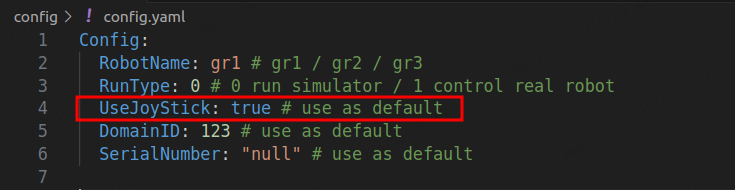
Reason: The configuration is set to start without a joystick.
Solution: Set UseJoyStick to true in the config/config.yaml file.
2. Aurora program fails to start
a. Aurora program startup displays:
[error] 192.168.137.93 init failed with code: -102
[error] init robot failed.
Reason: Aurora did not receive actuator data during startup, causing the startup self-check to fail.
Solution: Confirm whether the actuators have faults and if the actuator addresses are reachable. Also, verify that the actuator firmware version is compatible with Aurora.