After Operation Completion
Stopping the Robot
Manual Stop via Remote Controller
To pause the robot's movement, press the "Stand" button on the remote controller. The robot will switch to Standing Mode. If it was already in Standing Mode when paused, the robot will remain in Standing Mode.
Emergency Stop
Press the emergency stop button promptly in the following situations:
- The robot's movement is abnormal or does not meet expectations (speed, direction, etc.);
- When disassembly or maintenance is required;
- When electrical faults such as electric leakage or short circuit occur;
- When risk is anticipated, such as the robot is about to fall.
Powering Off the Robot
When ready to power off the robot, please follow these steps:
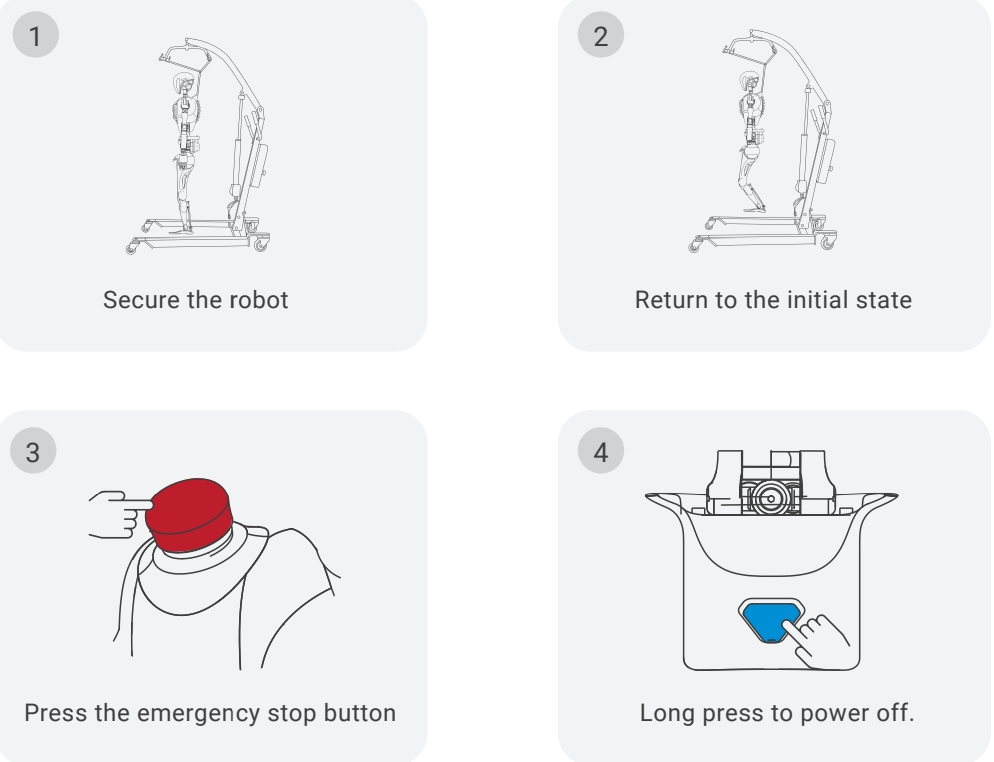
Note: Press and hold the power switch for 15 seconds to force shutdown the robot. This function is primarily used when the robot cannot be shut down normally. Please note that a forced shutdown may cause file corruption on the robot; operate with caution.